




Vendure Store Credit Plugin
A plugin for channel-aware store credit wallets with ledger tracking. Customers can use wallet balance as a payment method at checkout.
Installation
npm i @pinelab/vendure-plugin-store-credit
// vendure-config.ts
import { StoreCreditPlugin } from '@pinelab/vendure-plugin-store-credit';

plugins: [StoreCreditPlugin],
Run a migration to add the Wallet entities to the database, then create a Payment Method in the admin using the store-credit handler.
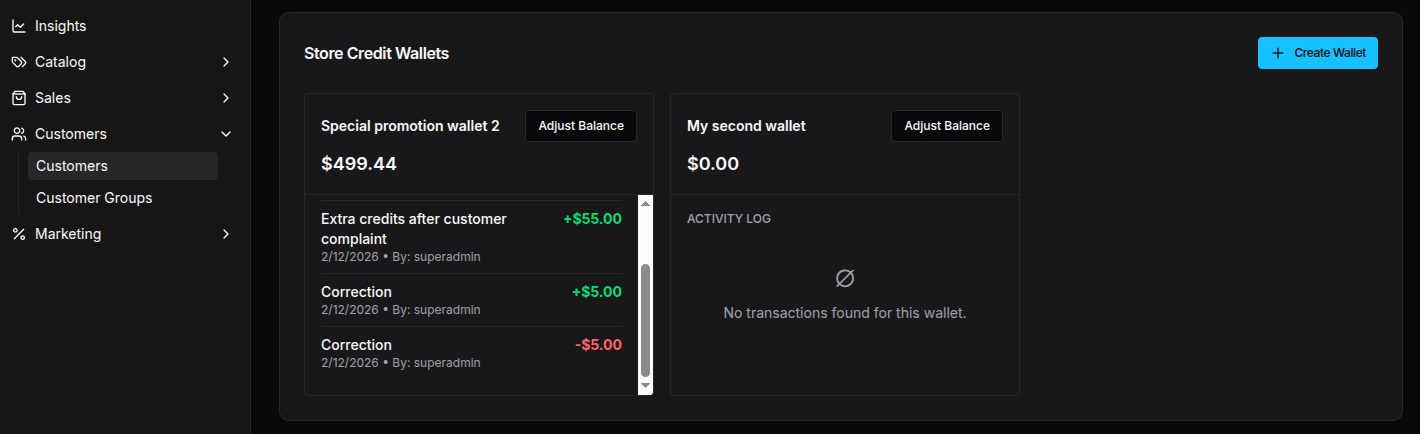
You also need to rebuild the admin dashboard to see the new Store Credit Wallets on the customer detail page.
Admin API
These functions are available in the admin API.
Create wallet
Each customer can have multiple wallets. This mutation creates a new wallet for the customer. Starting balance is always 0.
mutation CreateWallet($input: CreateWalletInput!) {
  createWallet(input: $input) {
    id
    name
    balance
    currencyCode
    adjustments {
      id
      amount
    }
  }
}
# Variables: { "input": { "customerId": "1", "name": "Gift card" } }
Set balance (add or subtract)
mutation AdjustBalance($input: AdjustBalanceForWalletInput!) {
  adjustBalanceForWallet(input: $input) {
    id
    balance
  }
}
# Variables: { "input": { "walletId": "1", "amount": 1500 } }
# Amount in minor units (1500 = €15.00). Use negative for deductions.
Refund payment to store credit
An admin can choose to refund any payment to store credit wiht the custom refundPaymentToStoreCredit mutation:
mutation RefundToStoreCredit($paymentId: ID!, $walletId: ID!) {
  refundPaymentToStoreCredit(paymentId: $paymentId, walletId: $walletId) {
    id
    balance
  }
}
To refund a payment that was made with store credit, you can use the built-in refundOrder mutation supplied by Vendure. In this case it will refund the store credit to the same wallet that was used to make the payment.
Storefront usage
Customers can pay for orders using their store credit balance.
mutation {
  addPaymentToOrder(
    input: { method: "store-credit", metadata: { walletId: "1" } }
  ) {
    ... on Order {
      id
      code
    }
  }
}
Optionally, a customer can choose to partially pay for an order by specifying the amount to pay with store credit.
mutation {
  addPaymentToOrder(
    input: {
      method: "store-credit"
      metadata: { walletId: "1", amount: 100000 }
    }
  ) {
    ... on Order {
      id
      code
    }
  }
}
Logged-in customers can fetch their wallets via activeCustomer:
query MyWallets {
  activeCustomer {
    id
    wallets {
      items {
        id
        name
        balance
        currencyCode
        adjustments {
          amount
        }
      }
      totalItems
    }
  }
}
Or query a single wallet by ID:
query Wallet($id: ID!) {
  wallet(id: $id) {
    id
    name
    balance
    currencyCode
    adjustments {
      id
      amount
      createdAt
    }
  }
}
Gift cards
You can configure the plugin to automatically create gift card wallets when certain products are ordered. Use the createGiftCardWallet hook in the plugin options:
StoreCreditPlugin.init({
  createGiftCardWallet: async (ctx, injector, order, orderLine) => {
    // Return { price, cardCode } to create a gift card wallet for this item
    // Returning false skips this item
  },
});
The hook is called once for each quantity per order line item. For example, if an order has 1 order line with a giftcard, and the quantity is 3, the hook is invoked 3 times, allowing you to return a different cardCode for each individual gift card.
The generated gift card codes are saved to the order line's giftCardCodes custom field, so you can reference them later (e.g. for email delivery or customer notifications).
Paying with a gift card code
Customers can pay for an order by providing the gift card code at checkout. The full wallet balance will be applied to the order (up to the outstanding amount).
mutation {
  addPaymentToOrder(
    input: { method: "store-credit", metadata: { giftCardCode: "ABC123" } }
  ) {
    ... on Order {
      id
      code
    }
  }
}
To only pay a specific amount with the gift card, include the amount in the metadata:
mutation {
  addPaymentToOrder(
    input: {
      method: "store-credit"
      metadata: { giftCardCode: "ABC123", amount: 100000 }
    }
  ) {
    ... on Order {
      id
      code
    }
  }
}
Gift card code security
Gift card wallets are identified by their code. Treat this code like cash:
anyone who knows the code can spend the wallet. It is the responsibility of the
consuming project (via the createGiftCardWallet strategy) to make sure the
returned cardCode is sufficiently unguessable — use a cryptographically
secure random generator (e.g. crypto.randomUUID() or generatePublicId()
from @vendure/core) and never derive the code from predictable data like
order id or sequence numbers.
The walletByCode query has a few safeguards to reduce enumeration risk:
- on the admin API it requires the
UpdateOrderpermission; - on the shop API it requires the caller to have an active order on the session;
- it returns
nullfor unknown codes (instead of throwing) so the API does not leak whether a given code exists; - lookups are channel-scoped.
Helper scripts
You can create wallets with a specified balance for all (or given) customers with the following script that is included:
import { bootstrap } from '@vendure/core';
import { createWalletsForCustomers } from '@pinelab/vendure-plugin-store-credit';
import dotenv from 'dotenv';
dotenv.config({ path: process.env.ENV_FILE });

// Import vendure config after dotenv.config() so env variables are available in config
import('./vendure-config')
  .then(async ({ config }) => {
    const app = await bootstrap(config);
    const wallets = await createWalletsForCustomers(
      app,
      // Details for all wallets
      {
        name: 'Special promotion wallet',
        balance: 123456,
        balanceDescription: 'Special promotion credits',
      },
      // Administrator email address to use for record-keeping
      'admin@example.com',
      // A list of customer email addresses to create wallets for. If omitted, all customers get a wallet.
      undefined
    );
    console.log(`Created ${wallets.length} wallets`);
    await app.close();
  })
  .catch((err) => {
    console.error(err);
  });
FAQ
Can I create a wallet with an initial starting balance?
To create a wallet with an initial starting balance, you can create a wallet for a customer on the customer detail page in the admin dashboard. Wallets always start with a balance of 0, but you can adjust the balance to anything you want after creation. Wallets always start with 0, so that you can recalculate the current balance by 'rerunning' all the adjustments.
Can I delete a customer's wallet?
Currently you can not delete a wallet, because of accountability: you need to be able to see the history of adjustments on the wallet. Future version will allow you to archive a wallet.