




Vendure Alerting Plugin
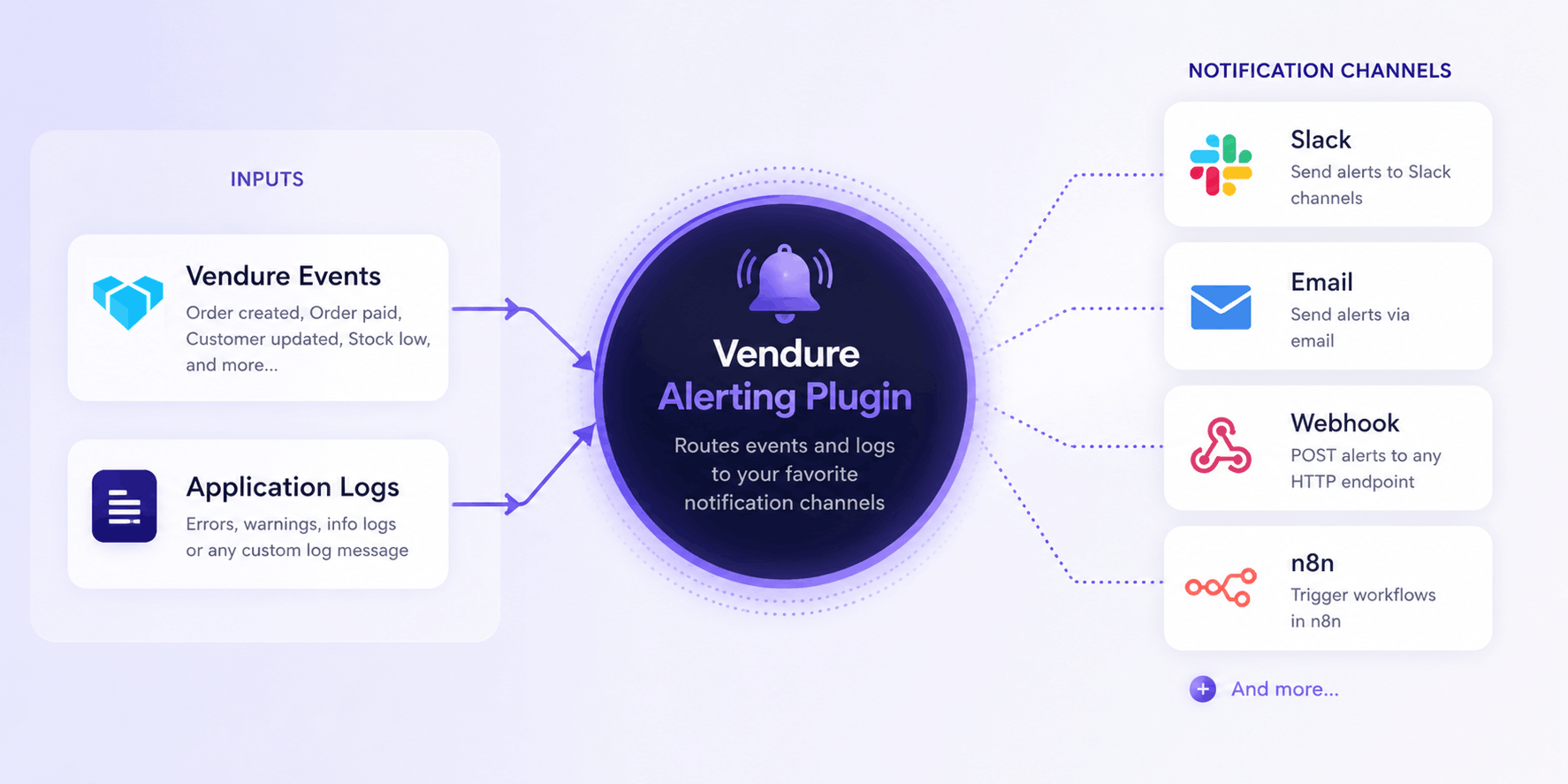
Send notifications based on Vendure events and log messages via configurable notifiers like webhooks, slack or N8N.
Getting started
import {
  AlertingPlugin,
  EventAlert,
  LogAlert,
  WebhookNotifier,
} from '@pinelab/vendure-plugin-alerting';
import {
  PaymentStateTransitionEvent,
  ProductEvent,
  ProductService,
} from '@vendure/core';

// Slack example. Get the webhook URL from your slack account: https://docs.slack.dev/messaging/sending-messages-using-incoming-webhooks/
const slack = new WebhookNotifier({
  name: 'slack',
  url: process.env.SLACK_WEBHOOK!,
});

const n8n = new WebhookNotifier({
  name: 'n8n',
  url: 'https://n8n.example.com/webhook/alert',
});

const plugins: VendurePlugin[] = [
  AlertingPlugin.init({
    alerts: [
      // Alert on order payment failure
      new EventAlert([slack, n8n])
        .on(PaymentStateTransitionEvent)
        .filter((e) => e.toState === 'Error') // Use this to decide when to alert
        .notify((e) => `Payment error for order "${e.order.code}"`), // Notifies via Slack and n8n

      // Async notify with RequestContext and Injector
      new EventAlert([slack])
        .on(ProductEvent)
        .notify(async (ctx, injector, event) => {
          const productService = injector.get(ProductService);
          const product = await productService.findOne(ctx, event.entity.id);
          return `Product updated: ${product?.name}`;
        }),

      // Alert on any error log from PaymentService
      new LogAlert([slack])
        .onLog('error', 'warn')
        .filter((log) => log.loggerCtx === 'PaymentService')
        .notify((log) => ({
          subject: `[${log.level}] ${log.loggerCtx}`,
          text: log.message,
        })),
    ],
    // Deduplicate identical notifications to prevent alert storms: Only notify every once per X ms
    deduplicationWindowMs: 60_000, // default
  }),
];
Email notifier
Send alerts as plain-text emails via Vendure's built-in NodemailerEmailSender. No templates are required — the alert subject and text are sent directly.
import { EmailNotifier } from '@pinelab/vendure-plugin-alerting';

const email = new EmailNotifier({
  name: 'email',
  from: 'alerts@example.com',
  to: 'admin@example.com',
  transport: {
    type: 'smtp',
    host: 'smtp.example.com',
    port: 587,
    auth: {
      user: 'username',
      pass: 'password',
    },
  },
});

new LogAlert([email]).onLog('error').notify((log) => ({
  subject: `[${log.level}] ${log.loggerCtx}`,
  text: log.message,
}));
You can use any transport supported by the EmailPlugin, such as ses, sendmail, or file. You can also pass a custom EmailSender via the emailSender option.
Custom Notifiers
Implement the Notifier interface to create custom channels (e.g. SMS) and use custom metadata.
import { AlertMessage, Notifier } from '@pinelab/vendure-plugin-alerting';

// Example notifier that uses custom metadata
export class CustomNotifier implements Notifier {
  name = 'my-custom-notifier';

  notify({subject, text, metadata}: AlertMessage): Promise<void> {
    // This is where you would implement the logic to send the alert message to your desired destination.
    // With the given metadata you could send custom body or headers for example.
    const authorization = metadata.myHeaders.bearerToken
  }
}

// You would use this Notifier like this:
const customNotifier = new CustomNotifier();
new EventAlert([customNotifier])
  .on(PaymentStateTransitionEvent)
  .filter((e) => e.toState === 'Error')
  .notify((log) => ({
    subject: `My subject`,
    text: `my custom message`,
    metadata: {
      key: "you can pass anything you want to your custom notifier here"
      key2: "It is up to your notifier to use the metadata object"
    }
  })),
Deduplication
Identical alerts (same notifier + subject + text) fired within deduplicationWindowMs are dropped. This prevents alert storms when many events fire in rapid succession.
Retry
Alert delivery is backed by the Vendure JobQueue. If a notifier throws, the job is retried with the configured retry strategy.
Guidelines
notify()is executed in the main process before the alert is enqueued to the worker. Keep the function lightweight — do not run heavy or long-running logic insidenotify().- Be selective about the events and log levels you subscribe to. Listening to all
warnanderrorlogs can generate a high volume of alerts and put unnecessary load on your system.
License
MIT